Posted on

SAP HANA Internet of Things (IoT): Raspberry, Arduino Uno, XSJS & SAPUI5: Part 2


SAP HANA IoT and The Internet of Things

If you have not seen yet, double check the introduction and the first part of this SAP HANA IoT series.
SAP HANA IoT Internet of Things: Raspberry, Arduino Uno, XSJS & SAPUI5Today, in this article we are going to perform:

Step 1 – Connect our Arduino to a Computer and checking if the analog input is working perfectly

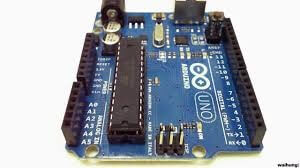
For this experiment we have photo sensors that will detect the light intensity and give the data to a computer by serial port communication.

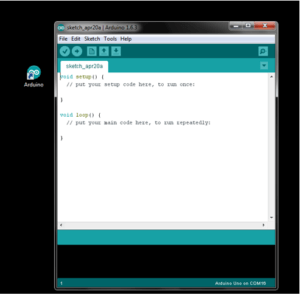
First, install the Arduino Kit from here, to your computer. In our scenario, we will be using Windows.

It looks like this after the installation:


Check also the serial port which is connected to Arduino and set the right port in your installed software:


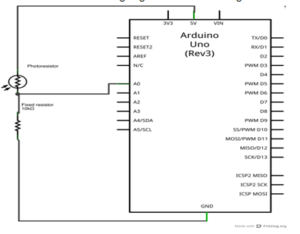
Now, for this demo we are going to follow the circuit diagram below:


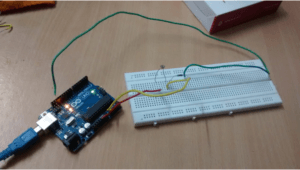
Our circuit looks like this:


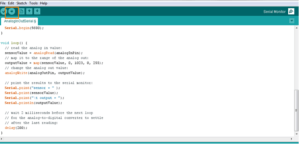
Let’s have a look at the code which takes analog input from serial output:


/*

Analog input, analog output, serial output
Reads an analog input pin, maps the result to a range from 0 to 255
and uses the result to set the pulsewidth modulation (PWM) of an output pin.
Also prints the results to the serial monitor.
The circuit:
* potentiometer connected to analog pin 0.
Center pin of the potentiometer goes to the analog pin.
side pins of the potentiometer go to +5V and ground
* LED connected from digital pin 9 to ground
created 29 Dec. 2008
modified 9 Apr 2012
by Tom Igoe
This example code is in the public domain.
*/
// These constants won’t change. They’re used to give names
// to the pins used:
const int analogInPin = A0; // Analog input pin that the potentiometer is attached to
const int analogOutPin = 9; // Analog output pin that the LED is attached to
int sensorValue = 0; // value read from the pot
int outputValue = 0; // value output to the PWM (analog out)
void setup() {
// initialize serial communications at 9600 bps:
Serial.begin(9600);
}
void loop() {
// read the analog in value:
sensorValue = analogRead(analogInPin);
// map it to the range of the analog out:
outputValue = map(sensorValue, 0, 1023, 0, 255);
// change the analog out value:
analogWrite(analogOutPin, outputValue);
// print the results to the serial monitor:
Serial.println(sensorValue);
// wait 5 milliseconds before the next loop
// for the analog-to-digital converter to settle
// after the last reading:
delay(500);
}

Here we are trying to read the analog signal from the photo sensor, via Arduino, and then Arduino will send it via serial port to the computer and use it to show the data sensor reading.

After writing the program you should upload the program to the Arduino Uno.


And now to see the magic happening, open the serial monitor in top right side of the program.


We have demonstrated the result of the step 1 in a short video: SAP HANA IoT with Arduino and Raspberry Pi.

In SAP HANA IoT With Arduino and Raspberry Pi: Part 3, we will be performing step 2.

UI5CN

Posted on

SAP UX Basics – Wire Framing Phase

SAP UX Basics – Wire Framing Phase

In the first part of this article we discussed what UX means, what a Persona is and described the UX first design phase.

In this second phase, you have to map your critical ideas, customer profile and customer requirements into technical components.

It is the Wire Framing phase.

What is Wire Framing ?SAP Wire Framing

Wire Framing is when your ideas and all of your design that are in your mind, which you got by talking with your customer in the workshops, will be drawn into sketches that will look like real solutions, like web applications or mobile apps.

There are some useful tools for Wire Framing, in the market.

What are the main Wire Framing tools ?

  • Moqups and Balsamiq

Moqups and Balsamiq are framing tools, you can use for free during the evaluation period.SAP Moqups Balsamic

They are very simple to use and with Moqups is even easy to share through Google Drive. You can give the link to your customers and let them share and find out if they really like the user interface of the final design.

We will be writing reviews of these tools in future articles.


  • SAP Protyping Toolkit

On the SAP side, you have the prototyping toolkit in SAP Experience, where you can download it.SAP Prototyping Kit

Prototyping toolkit is not a tool, it’s a PowerPoint and it’s a smart approach by SAP to give a wire-framing solution.

In there you can find slides with sample applications, which is nothing but the components that you will change to show to your customers.

Go for SAP Experience and checkout. There are many small details that SAP has covered.

Everyone should know their content.


SAP AppBuilder

  • SAP AppBuilder

Finally, there is SAP AppBuilder.

It is a wireframing tool that automically generates code and can be useful for designing very simple mobile applications. It is built in Node.js.

Topics to keep in mind during Wire Framing phase

  • Try to design the solution along with your Client since immediate feedback and many interactions will save time.
  • It is very important to get a fast feedback from the Customer regarding his requirements.and he should understand what they are going to get after this solution is being delivered.
  • SAPUI5 technology and Fiori are so much new that only a few customers have experience with this kind of user interface.
  • This iterative and incremental process will save you time and effort because you will have an idea of the development effort.
  • Bear in mind there can be situations where you can have the exactly same designs but the effort required are considerably different for each one. The UI is equal but the UX is much different.
  • If you don’t have any idea about the effort of the development then it will be difficult to choose the right design. For this reason every UX designer should have some idea about the development effort. It always helps.

UI5CN

Posted on

SAP UX Basics – What is a Persona ?

SAP UX Basics – What is a Persona ?

In this article, we are going to talk about User eXperience a little more.

What is UX ?

Traditionally people are confused with what is user experience and what is the difference between User Interface (UI) and User eXperience (UX).

There are a lot of differences between UI and UX since UX is a very broad concept and it is not only design or the way the What is UXinterface looks like.

Google definition of UX: “The overall experience of a person using a product such as a website or computer application, especially in terms of how easy or pleasing it is to use”.

The key point Google is mentioning here is Usability.

UX is the usability of one solution but keeping in mind its specific customer.

So when you are a UX developer, you are both a UX designer and a developer, since you are going to develop the solution based on your initial design, focusing on the usability and your customer needs.

What is a Persona ?

The first step of going towards any UX design is to find out your customers, your Personas.SAP UX Persona

So what is a Persona ? Persona is a personification of your real customer, who is going to use your application.

Generally, what we do when we go to a UX workshop is to know more about our customer users, the ones who are going to use our solution and see what is their specific age group, their thinking pattern, their working condition, their priorities, lifestyles and physical attributes.

This helps a lot while designing the solution because you can keep in mind your customer needs and goals.

So that’s the Persona.

In the second part of this article we will be talking about the Wire Framing phase and the tools you can use.

UI5CN

Posted on

SAP HANA Internet of Things (IoT): Raspberry, Arduino Uno, XSJS & SAPUI5: Part 1


SAP HANA IoT and The Internet of Things

If you have not seen yet, double check the introduction of this series.

Before starting the project we should know why we selected both Arduino and Raspberry Pi .

SAP HANA IoT Project – why Raspberry Pi and Arduino ?

The Raspberry Pi is a low-cost credit-card-size computer with an ARM-processor that has a huge community to help to build applications.

pie

Raspberry Pi can multitask processes – it can run multiple programs in the background while activated. For example, you can have a Raspberry Pi that is serving as both a print server and a VPN server, at the same time.

Arduino is a micro-controller with easier capability to integrate analog input,

aud

The Arduino IDE is significantly easier to use than Linux.

For example, if you wanted to write a program to blink a LED with Raspberry Pi, you’d need to install an operating system and some code libraries – and that’s just to start. Whereas, with Arduino, you can get a LED light to blink in just eight lines of code.

Arduino isn’t designed to run an OS or a lot of software, you can just plug it in and get started.

You can leave an Arduino plugged in as it conducts a single process for a long time, and just unplug it when you’re not using it. This is why we recommend the Arduino for beginners before going for Pi.

As per Limor Fried, the founder of Adafruit, a DIY electronics store that offers parts and kits for both Arduino and Pi projects, “The Arduino is simpler, harder to ‘break’ or ‘damage’ and has much more learning resources at this time for beginners, With the Pi you have to learn some Linux as well as programming—such as Python. The Arduino works with any computer and can run off of a battery. You can also turn it on and off safely at any time. The Pi setup can be damaged by unplugging it without a proper shutdown.”

While the Raspberry Pi shines in software application, the Arduino makes hardware projects very simple. It’s simply a matter of figuring out what you want to do.

Sound like Raspberry Pi is superior to Arduino, but that’s only when it comes to software applications. Arduino’s simplicity makes it a much better bet for pure hardware projects.

The ultimate answer when deciding between the Pi and Arduino is, “Why choose?”

If you’re looking to learn about IoT, each one will teach you something different.

Raspberry Pi and Arduino are complementary. Ideally expert suggests a scenario where the Arduino is the sensory workhouse, while the Pi doles out directions.

both

Our SAP HANA IoT Project Steps

So we are going to do exactly that, in this article series we are going to use:

  1. Arduino for analog interface
  2. and providing data in digital format to Raspberry Pi
  3. and Pi should take care of communication to SAP HANA.

Simplified steps are :

Step 1: Connect Arduino to a Computer and checking if the analog input is working perfectly. For this experiment, we have photosensors that will detect light intensity and give the data to a computer by serial port communication, through Arduino.

Step 2. Connect Raspberry Pi to Arduino and able to establish the same configuration which was achieved via computer and Arduino. Also setting up a webserver in Raspberry Pi which can communicate over internet.

Step 3: Storing data into the SAP HANA system from Pi and displaying it using SAPUI5 in near real time.

In SAP HANA IoT With Arduino and Raspberry Pi: Part 2, we will be performing step 1.

UI5CN

Posted on

What is SAP’s new User Experience (UX)

What is SAP’s new User Experience (UX)

Today, in this article, we are going to see what is SAP’s new User Experience (UX).

But before going into more detail, there is a question:

Why has SAP introduced this new User eXperience in UI which is so much different from the traditional way of working?  sapui5 customer expectation

The answer is simple: from past few years, people are using iPhones, tablets, doing more eShopping, using Twitter, Facebook and other social media applications to collaborate and share and this has raised consumer expectation of what interaction should be like and provided SAP to get a good opportunity to transform its 20 year-old UI design into a new look.

SAP New UX 5 Key Principles

If you take a deep look into this new User eXperience, there are 5 Key Principles that should be followed:sapui5 5 key principles
  1. Keeping it simple – the application should be created for one user type with one use case and covered within three different navigations screens.
  2. Role-Based – so that the same application can be used by many individual users at a different level, at the same time.
  3. The application should provide Instant Value – which means the users can directly see the advantage, so they can go for the adoption.
  4. There should be coherency for all the application, no matter the function domain.
  5. The applicaiton should run in all devices, should be Responsive.

Application Categories

To bring this to the customer landscape within an existing business process, SAP has characterized applications in 3 different ways or categories:
 sapui5 3 categories
  1. New Applications – These applications are very innovative, totally new and many of them are native. New functionality and new skin.
  2. Renew Applications – These applications are also out of the box and mainly for a wider audience, for example, the existing VA03 Sales Order transaction. The same funcionality but with a different skin.
  3. Enablement Toolkits – There are many business processes which are specific to the customers for their own specific businesses. For these specific scenarios, there are technologies and frameworks like Floor Plan Manager, Script Persona or our Javascript library from SAP, called SAPUI5, that will help doing the mapping and fill the business gaps.

UI5CN